What is Telephone Visit Verification (TVV) and how do I use it?
Telephone Visit Verification (TVV) is a tool which can be used to record location data. Unlike Electronic Visit Verification (EVV), TVV does not require GPS and an Internet Connection to function. Staff verify their location by using a Consumer's landline phone to call SETWorks Telephone Visit Verification (TVV) Phone Line.SETWorks Electronic Visit Verification (EVV) is the first recommended tool for recording location and check-in/check-out data. We only recommend using Telephone Visit Verification (TVV) in situations where EVV cannot be used, such as in areas that do not receive reliable internet service.
TABLE OF CONTENTS
- What is Telephone Visit Verification (TVV) and how do I use it?
- Requirements
- How to Use Telephone Visit Verification (TVV)
Requirements
The following requirements are mandatory for SETWorks TVV to function properly.Prerequisites:
- Consumer or has the phone number you will be calling from on their profile (Consumer Details)
- Consumer has a valid address
- One or more Scheduled Encounter Note scheduled on the same day (00:00-23:59). (Must be created before calling)
- SETWorks User with their 5 digit Staff ID and 4 digit PIN. (You can find your SETWorks Staff ID in Staff Management or on the top header bar next to their name.)
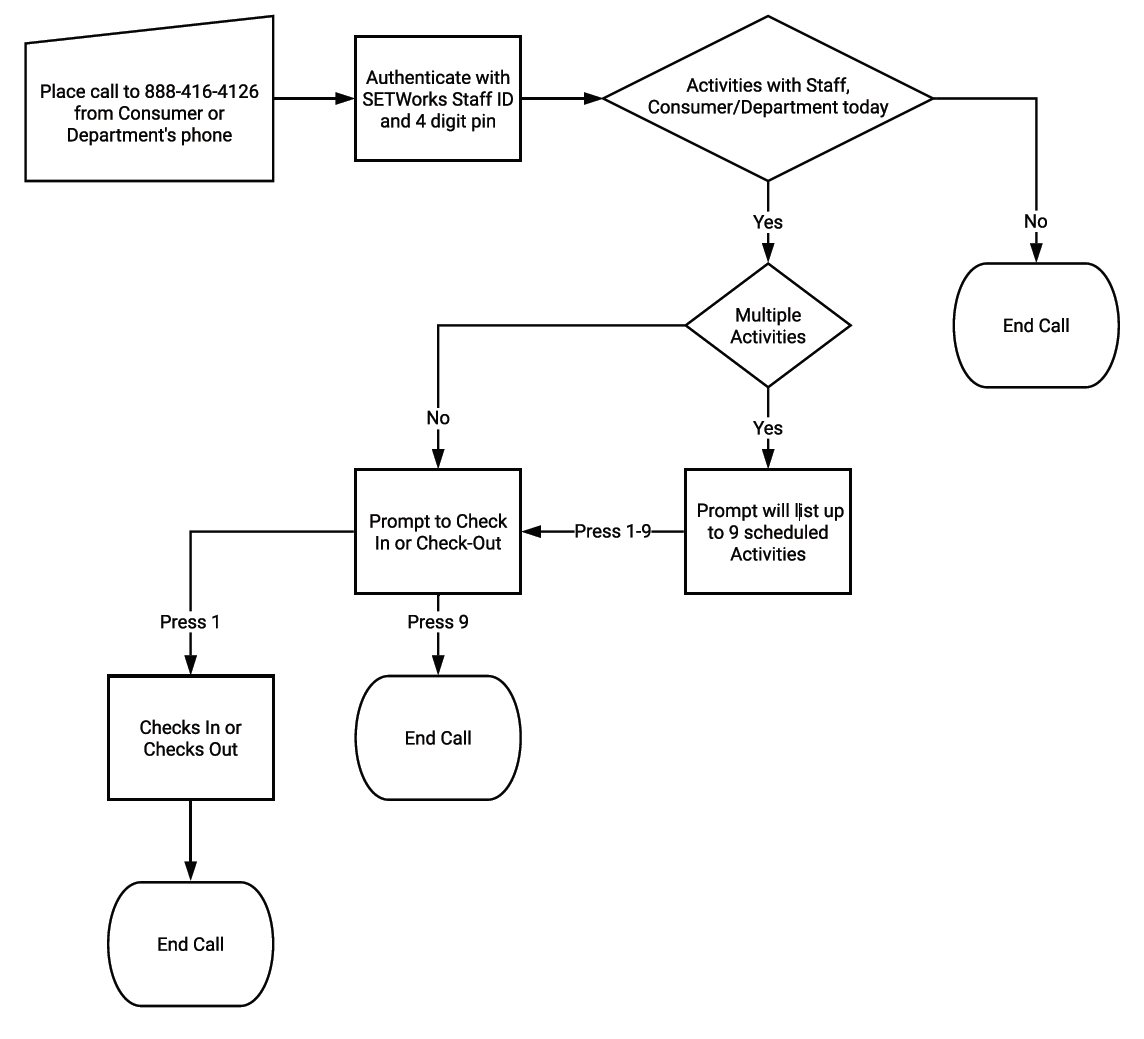
How to Use Telephone Visit Verification (TVV)
- Place call to 888-416-4126 from Consumer or Department's phone
- Authenticate with SETWorks Staff ID and 4 digit pin
- Phone will list activities with Staff, Consumer/Department today
- Prompt to Check In or Check-Out
- Press 1 - Checks In or Checks Out
- Press 9 - End Call
Viewing TVV Data
You can use the following report to view TVV data:TVV Reporting / Events
Was this article helpful?
That’s Great!
Thank you for your feedback
Sorry! We couldn't be helpful
Thank you for your feedback
Feedback sent
We appreciate your effort and will try to fix the article